Comedy horror · Play as a hamster
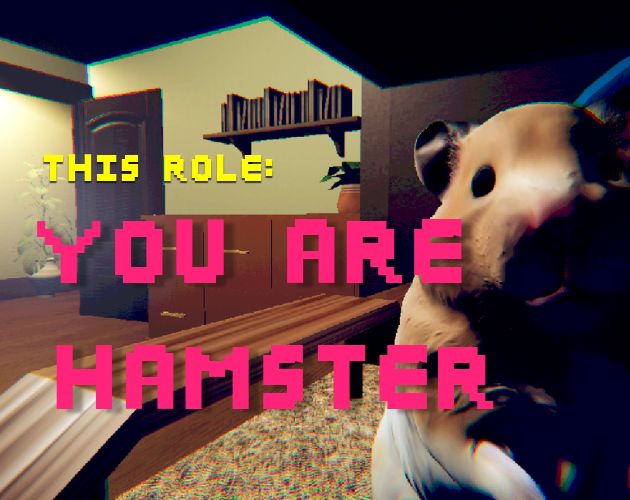
This Role:
You are Hamster
You're a small pet in your owner's room. Then you notice something they cannot see. Explore the room, follow its prompts, and discover where this short, strange story goes.
The embedded browser build is separate from SeenThai's official Windows release. Its first load can take a while. If the frame does not load or its controls feel cramped, open the game in a new tab. The creator describes the original experience as about 10 minutes long with no pause or save feature.
How to play This Role: You are Hamster
SeenThai's release page lists three keys: WASD to move, Spacebar to jump and E to interact. The hosted player also shows mouse-look and touch-control hints during loading. This is an exploration story, so look for prompts near objects instead of assuming every item can be used.
Wait for the bedroom to load. Click inside the game frame to direct keyboard and mouse input to it.
Use WASD and the mouse to orient yourself in the cage and see what is nearby.
Move near an interesting object and press E when the game presents an interaction.
Use Spacebar when a jump helps you reach a new position. Follow the story's cues through to the ending.
| Action | Input | When it helps |
|---|---|---|
| Move | W, A, S, D | Explore the cage and the room from the hamster's viewpoint. |
| Look | Mouse | Face an object before attempting an interaction. Click the frame first if the mouse does not respond. |
| Jump | Spacebar | Reposition at an obstacle or a change in height. |
| Interact | E | Respond to a visible prompt when close enough to its object. |
| Touch play | On-screen controls in the hosted build | On a phone or tablet, turn to landscape for more room around the game. |
The original Windows listing states that there is no pause or save. Plan one uninterrupted session rather than relying on a checkpoint. Browser-port behavior may differ, and mobile support comes from the hosted build, not the Windows listing.
Spoiler-light walkthrough
The creator provides the premise and controls but no official step-by-step route. This guide follows the visible spaces and interaction system without inventing a hidden item list, ending count or exact trigger order.
A first run from cage to credits
- Begin in the cage. Turn slowly and identify the shelter, water bottle, wheel and the owner's room beyond the bars. This makes it easier to recognize where a later cue points.
- Move toward an object that draws attention. Stop close to it, face it, and watch for the interaction prompt before pressing E.
- If you cannot reach a position, try one deliberate Spacebar jump and adjust the angle. Avoid repeated jumping while facing away from the destination.
- When the room begins to feel unusual, keep observing instead of rushing past a new prompt. The official premise says the hamster notices something the owner cannot see.
- Continue following the game's interactions and let the final scene and credits finish. The story is short enough to replay if you want to inspect a detail you missed.
If you get stuck
| Problem | What to try |
|---|---|
| WASD or the mouse does nothing | Click inside the game canvas, then test movement again. If the iframe still has no focus, use the new-tab link. |
| E does nothing near an object | Step closer, face the object directly and wait for a visible prompt. Not every object is interactive. |
| A jump does not reach a ledge | Adjust your starting position and camera angle, then make one measured jump. |
| The mobile controls overlap the scene | Rotate to landscape or open the game by itself in a new tab. |
| The player is blank or stuck loading | Refresh once, try the direct player link, or use the official Windows download if the browser build remains unavailable. |
The creator describes the game as a blend of horror and absurd comedy. To preserve the payoff, this guide stops before the final reveal; it covers every published control and the practical steps for reaching and using prompts.
Sources: SeenThai's official release page for the premise, controls, Windows platform, approximate length and save limitation; the hosted WebGL player for its loading and touch-control hints. The cover is the creator's artwork as displayed by YouAreHamster.com.
Questions players ask
Who made This Role: You are Hamster?
SeenThai created the original game. The official release and creator updates are on itch.io.
How long does it take?
The creator estimates about 10 minutes for the original game. Leave enough time for one uninterrupted playthrough because that release has no pause or save feature.
Can I play on a phone?
The hosted WebGL build advertises touch controls for phones and tablets. Its behavior can vary by browser and device; landscape mode and the direct player link give the controls more space.
Is this the official release?
This page embeds a separate browser build. The creator's official listing currently offers a Windows ZIP. Check that page for the latest original version.
All browser games on this site
Explore every game page in the collection. Each cover is shown in full, without cropping.