Baldi's Basics mod · WebGL test build
Odio el chocolate
A box of chocolates has been scattered through the school, and someone is chasing you. Find all 13 pieces and escape. Play the hosted browser build below, then use the mode and route guide to plan a complete run.
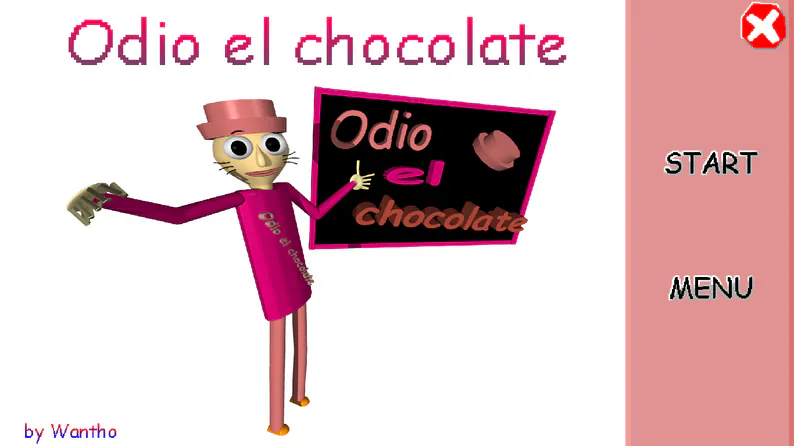
The embedded WebGL build is separate from Wantho's official Windows download. If it stays blank or does not take input, use the new-tab link or the creator's download page. The game's opening warning lists flashing lights, jump scares and loud sounds.
How to play Odio el chocolate
Wantho lists Odio el chocolate as a Windows Baldi's Basics mod. The player above is a separate WebGL test build. In its own How to Play screen, the game says the chocolates were scattered across different rooms and asks you to find 13 of them while avoiding the pursuer.
Wait for the progress bar to finish. Click the game canvas so your keyboard and mouse go to the player.
Start with Low Cortisol Mode if available. It is the gentler introduction to the school layout and item system.
In Main Mode, find 13 chocolates. Watch the on-screen chocolate counter so you know how many remain.
Once the objective is complete, reach the exit. Conserve stamina for dangerous corridors and the final trip out.
Default controls in this browser build
| Action | Default input | Practical use |
|---|---|---|
| Move and look | W, A, S, D; mouse to turn | Explore rooms and keep the exit route in mind. |
| Interact | Left mouse button | Open doors and collect a chocolate when prompted. |
| Use an item | Right mouse button | Use the selected item during a chase or at the right point in a room. |
| Select an item | 1, 2 or 3 | Switch to the item slot you need. |
| Run | Left Shift | Save stamina for dangerous corridors. |
| Look back / jump | Space | The controls screen lists Space for both actions; its effect depends on the situation. |
| Pause | Esc | Stop play or return to available menu options. |
These bindings come from the WebGL build's Menu → Options → Controls screen. You can change them there. A keyboard and mouse are recommended; mobile touch support has not been confirmed.
Odio el chocolate walkthrough
The browser build's How to Play and Main Mode screens say to find 13 chocolates in different rooms, then leave the school. No verified room-by-room map has been published by the creator, so this guide gives a repeatable route method without inventing item locations.
Choose the right mode
| Mode | What is shown | When to play it |
|---|---|---|
| Low Cortisol Mode | The mode menu calls it easier and best for a first run. | Learn the corridors, controls and item slots first. |
| Main Mode | Find 13 chocolates, then exit. | Use the full collection route below. |
| Baltazar Mode | An additional named mode. | Try after you understand the standard run; check its own objective screen. |
| Triple Trouble Mode | Marked as harder and unsuitable for beginners. | Save it for a practiced route through the school. |
Main Mode: a complete-run plan
From the first room to the exit
- At the start, read the objective and inspect the item bar and stamina meter. Confirm the chocolate counter begins at zero.
- Explore one branch of the school at a time. Note a visible landmark before each turn, then return to the main corridor rather than wandering between unfinished branches.
- Enter side rooms, interact with visible chocolates, and check that the counter increases. If it does not, look for a nearby prompt or try a different interaction key.
- Use normal movement while the corridor is clear. Keep stamina in reserve for escaping an approaching threat or crossing an exposed hall.
- As the count nears 13, retrace only the branches you left unfinished. Avoid spending your last item on an ordinary empty corridor.
- After collecting the thirteenth chocolate, follow the game's exit cue or return along the safest known route to the exit. Finish the run before trying a harder mode.
If a run keeps failing
If you get lost, make a short route note with each landmark and the number of chocolates collected there. If a chase ends your run, start the next attempt by clearing nearby rooms first and save your sprint for the corridor where you were caught. If you reach the exit too early, verify the counter: the Main Mode objective requires all 13 chocolates before leaving.
For Low Cortisol, focus on learning the layout rather than speed. For Baltazar and Triple Trouble, re-read their objective screens; the available sources confirm the modes' names but do not establish every rule change. A reliable advanced run begins with a route you can already finish in Main Mode.
Sources and scope: The objective, opening warning, Main and Low Cortisol modes, and default controls were checked in the linked WebGL build on 25 October 2026. Wantho's official release page confirms the creator and Windows download; Wantho's GameBanana listing confirms the Baldi's Basics mod. The title-screen thumbnail and the names of the additional modes were cross-checked against a gameplay gallery. The route plan is practical advice, not an official fixed map.
Questions players ask
Is Odio el chocolate an official Baldi's Basics game?
No. Wantho publishes it as a Baldi's Basics game mod. The original game's creator is credited separately on the mod listing.
Can I play it in a browser?
This page embeds the separately hosted WebGL test build linked above. Wantho's official release page currently lists a Windows ZIP, so the browser build may differ from that download.
How many chocolates are needed?
The game's Main Mode and How to Play screens say to find 13 chocolates and exit. Check the counter while playing.
Which mode should I start with?
Low Cortisol Mode is presented as easier. Learn its controls and corridors first, then attempt Main Mode and the harder alternatives.
All browser games on this site
Explore every game page in the collection. Every thumbnail is shown in full.